Best Free AI Tools in 2026: Honest Picks After Actually Using Them
From someone who's tested dozens of AI platforms and deleted most of them after a week.
Here's something no one tells you about AI tools: most of them are genuinely impressive in a demo and quietly frustrating in real daily use.
I've been using AI tools seriously since they became mainstream, and in 2026 the landscape has shifted significantly. The hype has settled. The tools that survived are the ones that actually make your work faster, not just the ones with the best launch tweet.
This guide covers what I actually use, what I recommend to people when they ask, and — just as importantly — what's worth skipping. Whether you're a student trying to get through research faster, a creator who needs to produce more content, a developer who wants to stop writing boilerplate, or a business owner looking at AI automation seriously — I'll give you straight answers.
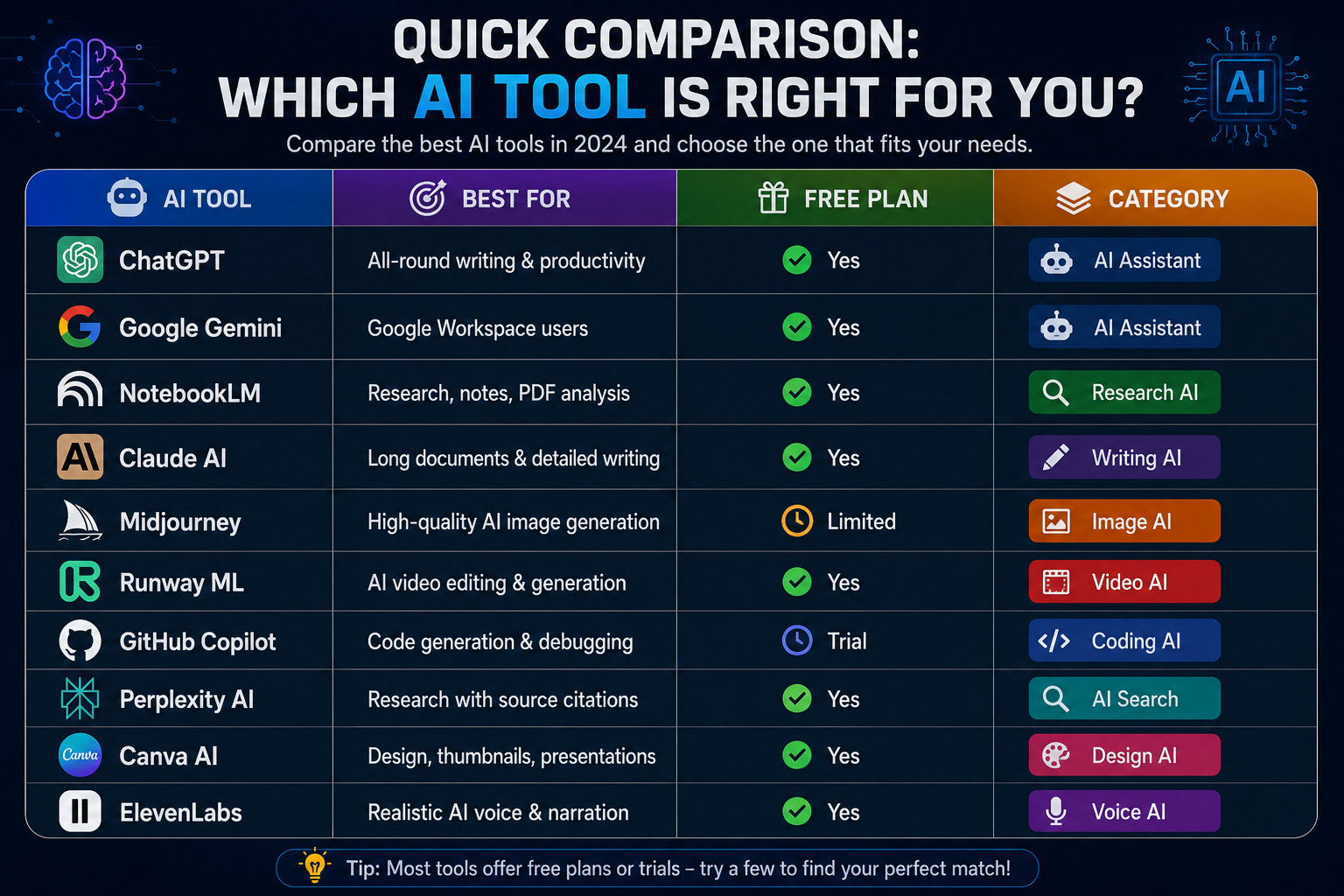
Quick Comparison: Which AI Tool is Right for You?
| AI Tool | Best For | Free Plan | Category |
|---|---|---|---|
| ChatGPT | All-round writing & productivity | Yes | AI Assistant |
| Google Gemini | Google Workspace users | Yes | AI Assistant |
| NotebookLM | Research, notes, PDF analysis | Yes | Research AI |
| Claude AI | Long documents & detailed writing | Yes | Writing AI |
| Midjourney | High-quality AI image generation | Limited | Image AI |
| Runway ML | AI video editing & generation | Yes | Video AI |
| GitHub Copilot | Code generation & debugging | Trial | Coding AI |
| Perplexity AI | Research with source citations | Yes | AI Search |
| Canva AI | Design, thumbnails, presentations | Yes | Design AI |
| ElevenLabs | Realistic AI voice & narration | Yes | Voice AI |
1. ChatGPT — Still the One Everyone Comes Back To
I've tried to replace ChatGPT multiple times. I keep coming back.
That's not a criticism of the alternatives — it's a testament to how well OpenAI nailed the core experience. ChatGPT feels like talking to a genuinely smart assistant who doesn't judge your half-formed questions and doesn't make you feel dumb for not knowing something.

For everyday use, it handles an astonishing range of tasks without needing you to become an expert prompter. Ask it to help you rewrite an email that sounds too aggressive. Ask it to explain a concept from your textbook in plain language. Ask it to generate a week of social media captions. It handles all of it with minimal friction.
The free tier is genuinely useful — not a crippled demo. The paid plan unlocks faster responses, image generation, and more advanced reasoning, but you can accomplish a lot without spending anything.
Where it struggles: very recent information (though web search helps), extremely niche technical domains, and tasks where you need cited sources. For those, keep reading.
Who should use it: Everyone, honestly. If you're only going to try one AI tool, this is the one.
Where it falls short: Not great for research that requires verified sources. Don't trust it blindly for facts — verify anything important.
💡 The Swiss Army knife of AI tools. Not always the best at any one thing, but reliable at everything.
2. Google Gemini — The One to Use If You Live in Google's World
If your life runs on Gmail, Google Docs, Google Drive, and Android — Gemini isn't just an AI assistant. It's a productivity upgrade for the tools you're already using every day.

Google search trends show massive continued interest in "Google AI" and "Google AI tools" — and for good reason. Gemini's real strength isn't the chatbot interface. It's what happens when it's embedded directly into your workflow: summarizing long email threads in Gmail, helping you structure documents in Google Docs, pulling information from your Drive files without you having to copy-paste anything.
The PwC and Anthropic enterprise partnership announcement — which is trending heavily right now — signals where the broader AI industry is heading: deep integration into existing business tools rather than standalone platforms. Gemini is already doing this better than most.
For students using Google Classroom, professionals on Google Workspace, and anyone with an Android phone — Gemini is worth exploring seriously. The integration advantages alone justify it.
Who should use it: Google Workspace users, Android users, anyone who wants AI embedded in tools they already pay for.
Where it falls short: If you're not in the Google ecosystem, the advantages mostly disappear. As a standalone chatbot, it's solid but not exceptional.
🔗 Best when connected. The deeper you're in Google's world, the more useful it becomes.
👉 Visit Google Gemini → gemini.google.com
3. NotebookLM — The Research Tool That's Genuinely Changing How People Study
NotebookLM is trending at +70% search growth right now, and if you haven't heard of it yet, pay attention — this one is different.
Most AI tools make things up when they don't know the answer. NotebookLM doesn't. It only answers based on the documents, PDFs, or sources you actually give it — and it tells you exactly which part of your source it's drawing from.
That distinction matters enormously for students, researchers, journalists, and anyone doing serious knowledge work. You upload your textbook chapters, research papers, or meeting notes — and then you can ask questions, get summaries, generate study guides, or create outlines, all grounded in your actual material.
The AI podcast feature is genuinely impressive: it can turn your uploaded documents into a realistic two-host audio conversation summarizing the content. I've used this to review material while commuting. It works surprisingly well.
For researchers and students especially, this is not a gimmick. It's a tool that changes how you interact with large amounts of information.
Who should use it: Students, researchers, journalists, analysts, anyone who regularly works with large documents or needs to synthesize information from multiple sources.
Where it falls short: It only knows what you give it. It can't browse the web or answer questions outside your uploaded sources.
📚 The most underrated AI tool on this list. If you do any kind of research, try this before anything else.
👉 Visit NotebookLM → notebooklm.google.com
4. Claude AI — When You Need Something Thought Through, Not Just Generated
Full disclosure: you're reading this on a site that used Claude to help with content — so take this with that context in mind. That said, the reasons I use it are genuine.
Claude's single biggest advantage over other AI writing tools is how it handles length and nuance. Most AI tools start degrading in quality when a task gets complex — they start repeating themselves, losing the thread, or giving generic answers. Claude maintains coherence and reasoning quality across very long conversations and documents in a way that's noticeably better than most alternatives.
For documentation, technical writing, long-form blog posts, detailed analysis, or any task where you need depth rather than a quick answer — Claude is consistently strong. Its responses also tend to sound more like a thoughtful human and less like a content-generation machine, which matters for anything you're actually going to publish.
The free tier is useful. The paid plan is worth it for heavy writers.
Who should use it: Writers, developers writing documentation, researchers who need detailed explanations, businesses creating long-form content.
Where it falls short: Image generation and real-time web search are more limited compared to ChatGPT. Not the first choice for quick, punchy creative content.
✍️ The best AI for deep, nuanced writing. When quality matters more than speed.
5. Runway ML — AI Video Tools Are Finally Actually Good
A year ago I would've told you AI video tools were impressive but not ready for real use. In 2026, that's changed.
Runway ML is the platform most serious video creators are using for AI-assisted editing. Background removal, motion tracking, text-to-video generation, and AI-powered inpainting — all of these now work well enough to actually speed up a real production workflow rather than just provide a party trick.
The text-to-video feature is where it gets genuinely exciting. Describe a scene, get a short video clip. It's not perfect — you'll notice AI artifacts if you look closely — but for B-roll, concept visualization, or creative experiments, it removes a significant barrier.
"AI video tools" remains in the top global search queries this week, and Runway is consistently the platform creators land on after searching.
Who should use it: YouTubers, TikTok creators, short-form content producers, anyone doing video marketing who doesn't have a full production team.
Where it falls short: Free tier is limited. For serious production use, you'll need a paid plan. Long-form video generation is still rough.
🎬 The point where AI video tools crossed from "interesting" to "actually useful."
👉 Visit Runway ML → runwayml.com
6. Midjourney — AI Image Generation at Its Best
If you want the highest quality AI-generated images available right now, Midjourney is still the answer.

Other AI image tools have gotten better. DALL-E 3, Stable Diffusion, Adobe Firefly — all genuinely capable. But Midjourney's output has a visual quality and artistic coherence that consistently outperforms the alternatives, especially for cinematic, detailed, or stylized images.
The learning curve is real. Midjourney rewards users who learn how to write detailed, specific prompts. Once you understand how it thinks, you can produce thumbnail images, marketing visuals, concept art, and branding assets that would have taken a graphic designer hours.
The free tier is currently very limited — you get a small number of generations before needing to subscribe. For serious use, the paid plan is necessary.
Who should use it: Designers, content creators, marketers, thumbnail artists, anyone who needs high-quality custom visuals regularly.
Where it falls short: Not free for meaningful use. Text rendering in images is still unreliable. Requires Discord, which some people find annoying.
🎨 Still the gold standard for AI image quality. Nothing else quite matches it.
👉 Visit Midjourney → midjourney.com
7. GitHub Copilot — The Coding Assistant That Actually Saves Time
I was skeptical about AI coding tools for a long time. Then I actually used Copilot for a month and stopped being skeptical.

The value isn't in having AI write your entire codebase. It's in eliminating the small, tedious parts of programming that drain your energy without adding challenge: boilerplate code, repetitive functions, standard patterns you've written a hundred times, documentation strings, unit test templates. Copilot handles these instantly, which means your mental energy goes toward the parts of the problem that actually require thinking.
For developers working with TypeScript, React, Python, or any mainstream language — the autocomplete suggestions are good enough that you'll miss them when they're not there. Students learning to code also find it useful as a way to see how patterns are typically written, though relying on it too heavily before understanding the fundamentals is a real risk.
Who should use it: Working developers, software engineers, CS students who already understand the basics, anyone writing code daily.
Where it falls short: Requires a paid subscription after the trial. Suggestions are sometimes confidently wrong — always review what it generates. Not a substitute for understanding what you're building.
💻 The first AI tool that genuinely made me faster at my actual job, not just at demos.
👉 Visit GitHub Copilot → github.com/features/copilot
8. Perplexity AI — When You Need Answers With Receipts
The problem with asking ChatGPT a factual question is that you don't always know if the answer is real or invented. Perplexity solves that.
Every answer Perplexity gives comes with citations. You can click through to the actual sources. It searches the web in real time and synthesizes current information rather than relying on training data from months ago. For research, fact-checking, and staying current on news — this workflow is significantly more trustworthy than a standard chatbot.
"What are the best AI tools" is a rising search query right now (+20%) — and if you asked Perplexity that question, it would give you a sourced, current answer. That's the difference.
Who should use it: Researchers, journalists, students who need citable sources, anyone who uses Google for research and wants smarter summaries.
Where it falls short: Less creative than ChatGPT. Weaker for writing tasks. The free tier has usage limits.
🔍 Research with receipts. The most trustworthy AI for factual questions.
👉 Visit Perplexity AI → perplexity.ai
9. Canva AI — Design Tools for People Who Aren't Designers
Canva was already the best option for non-designers before AI. The AI features they've added make it genuinely impressive.

Magic Design generates complete, professional-looking layouts from a simple text description. The AI background remover works better than most dedicated tools. Text-to-image lets you generate custom visuals without leaving your design workflow. And the AI presentation builder creates full slide decks from a topic prompt — not perfect, but a strong starting point.
For social media creators, small business owners, students making presentations, and freelancers producing marketing materials — Canva AI removes most of the friction that previously required either design skill or expensive software.
Who should use it: Social media managers, small business owners, content creators, students, anyone who needs professional-looking visuals regularly.
Where it falls short: The AI image quality doesn't match Midjourney. Advanced designers will find the constraints frustrating.
🖼️ Canva was already the best tool for non-designers. AI made it better.
10. ElevenLabs — AI Voice That Actually Sounds Human
If you've ever tried to use text-to-speech for a YouTube video or podcast and abandoned it because it sounded robotic — ElevenLabs changes that.

The voice quality is genuinely realistic. Intonation, pacing, emotional range — it handles all of these in a way that older text-to-speech systems never could. You can generate narration in multiple languages and accents, clone voices (with appropriate consent), and produce audiobook-quality audio from text.
For YouTubers who hate recording voiceovers, podcast creators working in multiple languages, and businesses that need consistent narration for training videos — ElevenLabs has become a legitimate production tool.
Who should use it: YouTubers, podcasters, educators, businesses needing narrated content at scale.
Where it falls short: Voice cloning raises obvious ethical questions — use responsibly. The free tier limits monthly character generation.
🎙️ The point where AI voice stopped sounding like a robot and started sounding like a person.
👉 Visit ElevenLabs → elevenlabs.io
What Are AI Tools, Really?
Here's a simple explanation for anyone still getting oriented: AI tools are software that uses machine learning and language models to help you do tasks faster — writing, designing, coding, researching, editing video, generating images, and automating workflows.
"What is AI" remains one of the top global search queries, which tells me the technology is still new enough for most people. The short answer: it's software that learns patterns from massive amounts of data and uses those patterns to generate useful outputs based on your instructions.
The tools on this list use different types of AI for different purposes — but they all share one goal: making you more capable than you'd be without them.
How AI Tools Are Actually Changing Work in 2026
The PwC and Anthropic enterprise partnership announcement — trending at +70% this week — is a signal of where things are heading. Large organizations are no longer asking "should we use AI?" They're asking "how do we integrate it into our existing workflows?"
The same shift is happening at every level. Students use NotebookLM instead of manually highlighting textbooks. Developers ship faster with Copilot. Content creators produce more with less friction using Canva AI and Runway.
"Enterprise generative AI tools" and "internal tools with AI" are both rising searches right now — because companies are realizing that productivity gains from AI aren't theoretical anymore. They're measurable.
The jobs most affected aren't being eliminated — they're being restructured. A marketer who uses AI tools effectively can do the work of two people. A developer with Copilot ships faster. A creator with Runway produces more. The advantage goes to people who learn to use these tools well.
Best Free AI Tools for Students
If you're a student and budget matters, here's the honest short list:
NotebookLM — Free, excellent for research and document analysis. Start here.
ChatGPT (free tier) — Good enough for most writing, studying, and brainstorming tasks without spending anything.
Perplexity AI — Free for basic use, reliable for research that needs citations.
Google Gemini — Free if you have a Google account, especially useful if you're already using Google Docs and Drive.
Canva AI — Free tier is generous for students making presentations and visual content.
You don't need to pay for anything to get significant value from AI as a student. Start with these five, learn them well, and you'll be ahead of most people.
Best AI Tools for Businesses
"Enterprise generative AI tools" and "internal tools with deeper AI integration" are two of the fastest-rising search categories this week — which reflects what business owners and managers are actually searching for.
For business use, the priorities are different from personal use: reliability, security, integration with existing workflows, and scalability matter more than novelty.
ChatGPT (Enterprise) — Trusted by large organizations, good privacy controls, versatile.
Claude AI — Strong for documentation, content pipelines, and long-form business writing.
Google Gemini (Workspace) — Best if your team already runs on Google tools.
GitHub Copilot — Essential if you have developers on staff.
Canva AI — Marketing teams love it for social content and design at scale.
The trend toward "internal tools with AI" reflects a smart insight: the highest ROI often comes not from flashy new platforms but from AI integrated into the tools your team already uses every day.
Are Free AI Tools Actually Worth Using?
Yes — but with realistic expectations.
Free tiers are genuine products, not just demos. ChatGPT's free plan is useful for most everyday tasks. NotebookLM is completely free and excellent. Perplexity's free tier handles most research needs.
Paid plans make sense when you're using a tool heavily for professional work. Faster responses, higher usage limits, and advanced features become worth the cost when AI is genuinely part of your workflow rather than an occasional experiment.
My honest advice: use the free tiers until they become a bottleneck. Then pay for the one or two tools you actually use daily.
How to Choose the Right AI Tool for You
Three questions to ask before picking a platform:
1. What specific task am I trying to do? Writing, video, images, coding, research, and voice all have different best tools. A hammer and a screwdriver are both tools — but they're not interchangeable.
2. How often will I actually use it? A tool you use once a month doesn't need to be the best one. A tool you use every day is worth spending time to learn properly.
3. Does privacy matter for this use case? Be thoughtful about what you upload to AI platforms, especially for business use. Read the privacy policies of any tool you're considering for sensitive work.
Final Verdict: What Should You Actually Install Today?
If I had to pick three tools for someone just starting out:
Start with ChatGPT — broad capability, free, and the most widely understood. Learn to use it well before adding more tools.
Add NotebookLM — especially if you're a student or do any research. It's free and genuinely different from other AI tools in a useful way.
Then pick one specialist tool based on your work — Runway if you make videos, Midjourney if you need images, Copilot if you code, ElevenLabs if you do audio.
The trap most people fall into is collecting AI tools without mastering any of them. Pick two or three, use them until they become second nature, and you'll get more value than someone with ten tools they barely understand.
Frequently Asked Questions
What are the best free AI tools in 2026?
ChatGPT, Google Gemini, NotebookLM, and Perplexity AI offer the strongest free tiers available right now. For most users, these four cover writing, research, and productivity without spending anything.
What is NotebookLM and why is it trending?
NotebookLM is Google's AI research tool that lets you upload documents and ask questions about them — with citations. It's trending at +70% search growth because students and researchers are discovering how much better it is than reading through documents manually.
Which AI tool is best for video editing?
Runway ML is currently the strongest AI video tool for creators. It handles background removal, motion tracking, and text-to-video generation at a quality level that's actually usable in real productions.
Are AI tools replacing jobs?
Not replacing — restructuring. People who use AI tools effectively are producing more output with the same time investment. The risk isn't AI taking your job; it's someone who uses AI well doing your job faster than you can.
Which AI tool is best for coding?
GitHub Copilot is the clear choice for working developers. It integrates directly into VS Code and JetBrains IDEs and handles boilerplate, autocomplete, and documentation in a way that meaningfully speeds up real development work.
What are enterprise generative AI tools?
Enterprise AI tools are platforms designed for business use at scale — with better privacy controls, team collaboration features, and integration with existing business software. ChatGPT Enterprise, Claude for Teams, and Google Gemini for Workspace are the main players right now.
Last updated: May 2026 | Tools tested over multiple weeks of actual daily use
If this helped, share it with someone still stuck Googling "what is the best AI tool" every few months.